YOUVI Door Station Module
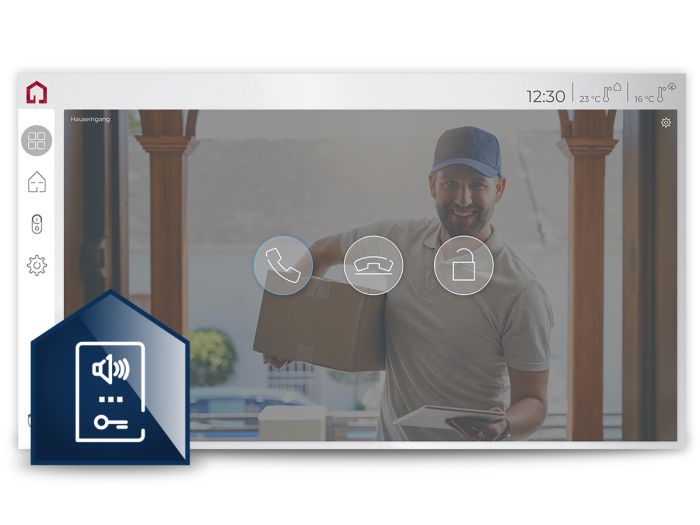
The door station module for the YOUVI Basic software package enables communication with the door station via the visualisation. Thanks to Direct SIP Support, SIP-compatible door stations can be integrated directly into YOUVI, for example from manufacturers such as AGFEO, DoorBird, Wantec or 2N. When the doorbell rings, users can see who is at the door directly via the visualisation on the touch panel, speak to the visitor and open the door. With YOUVI Mobile, users can also answer door calls with video and audio on their smartphones or tablets and open the door if needed.
Please note: The YOUVI door station module can only be used in combination with YOUVI Basic and compatible PEAKnx hardware. Direct SIP Support and mobile door communication are available from YOUVI 5.2 onwards. You can find out where to locate your YOUVI hardware key under the "Installation" tab.
Extension for YOUVI Basic: The intelligent software solution for KNX smart home control
With YOUVI Basic, you can easily and intuitively control the most common smart home functions such as lighting, shading and heating. The door station module and further add-ons allow you to extend the functionality of your building control system according to your needs.
Seamless door communication directly via the visualisation
By connecting SIP-compatible door stations, door communication is integrated into the visualisation. Thanks to Direct SIP Support, compatible door stations can be integrated directly into YOUVI from version 5.2 onwards. PEAKnx panels can thus be used as indoor intercom stations. When the doorbell rings, a window opens in the visualisation showing the live video feed from the door station. Users can then speak to the visitor, open the door or end the call.
Mobile door communication via smartphones and tablets
From YOUVI 5.2 onwards, door communication is also available in YOUVI Mobile. Users can answer door calls with video and audio directly via the app and open the door if needed. Within the home network, mobile door communication is available without YOUVI Connect. The YOUVI Connect module and an additional REMOTE+ subscription are required for mobile door communication outside the home network.
Stay informed even when away
If you are unable to answer a door call, the event is recorded in a gallery. Three images from the door station camera are captured and saved while the doorbell is ringing. This allows you to check who rang your doorbell while you were away.
Additional automation with the door station and Logic module
The integrated door station is also available in the Logic module: as a trigger when the doorbell rings or as an action to mute the ringtones of individual panels. This allows you to mute specific panels during your midday break or automatically lower the volume of the sound system when the doorbell rings.
Note on compatibility: The YOUVI door station module uses the SIP standard. You can find a list of door stations that have already been tested on the product page of the respective panel under the "Compatibility" tab.
- Integration of one or more SIP door stations
- Direct SIP Support for the direct integration of SIP-compatible door stations (from YOUVI 5.2 onwards)
- Integration of one or more panels as intercom stations
- Mobile door communication with video and audio, including door opening via YOUVI Mobile (from YOUVI 5.2 onwards)
- Without an incoming door call: View the door station camera feed, open the door via KNX or HTTP
- During an incoming door call: Accept or reject the video call from the door station, open the door via DTMF, KNX or HTTP, mute, end the call, deactivate the camera image
- Upload a ringtone or choose from five predefined ringtones
- Mute the ringtone
- Video transmission in MJPEG, JPEG and RTSP
- Recording of missed door calls in a gallery
Hardware and software requirements
The YOUVI door station module can only be used in combination with YOUVI Basic and compatible PEAKnx hardware (Controlmicro, Control 12, Control 16, Controlpro, Home Automation Server, Performance Server or USB-Connector).
Direct SIP Support and mobile door communication are available from YOUVI 5.2 onwards. Within the home network, mobile door communication is available without YOUVI Connect. The YOUVI Connect module and an additional REMOTE+ subscription are required for mobile door communication outside the home network.
Installing the Door Station Module
- First perform the following steps in YOUVI:
- If the required module or bridge has not yet been installed, install it via the YOUVI Dashboard. To do so, select the required module or bridge under “Available modules” and confirm the installation.

- Then open YOUVI Configuration > More > License and select the appropriate license for the add-on.
- Copy the hardware key.

- Carry out the following steps in the PEAKnx Shop:
- Enter the copied code under "Hardware Key". A license key will be generated and stored in the following.

- After completing the order process and paying the invoice, you can take the license key from your customer account. In the tab "My license keys" you will find all purchased license keys.
- Return to YOUVI:
- Open YOUVI Configuration > More > License and select the appropriate license for the add-on.
- Enter the license key under the "License" field and select "Activate".
The YOUVI door station module allows SIP-compatible door stations to be integrated into the YOUVI visualisation. Direct SIP Support is also available from YOUVI 5.2 onwards. Quick start guides for setting up the following door stations and systems are available:
- DoorBird IP video door station
- AGFEO IP-Video TFE
- 2N IP Verso
- Wantec Monolith C IP
- TCS
- MOBOTIX T25*
- Siedle InHome, Siedle Access
* When using the MOBOTIX MxEasy app on the Controlpro (1st generation), a new graphics driver must be installed:
https://www.peaknx.com/en/downloads
-
 YOUVI Connect Module€89.00
- YOUVI Camera Module€89.00
- YOUVI Logic Module€149.00
- YOUVI Netatmo Bridge€59.00